Settings
Every option in Engram's Settings section, and where the other settings live.
Open Settings / About from the bottom of the sidebar. It has four tabs.
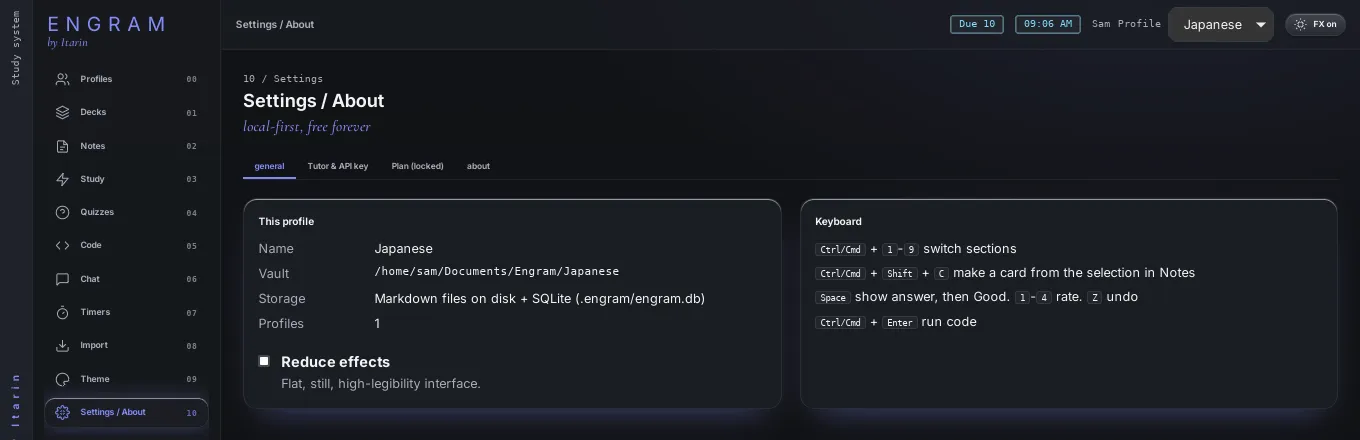
General
- This profile: the profile’s name, where its notes are saved (its vault), how its data is stored, and how many profiles you have.
- Reduce effects: a flat, still, high-legibility look. See Themes.
- Keyboard: a quick list of keyboard shortcuts.
Tutor & API key
Connects the AI provider used by the tutor chat and by AI-written quizzes: provider, model, API address, API key, default mode, creativity and extra instructions. See AI tutor.
Plan
Shows your tutor add-on: sign in with your email, start the free month, check your status, or open Manage subscription. Use a different email signs this computer out of the subscription. See AI tutor.
About
What Engram is, and an honest list of its limits, such as what each importer can’t bring across.
Settings that live elsewhere
| Setting | Where |
|---|---|
| Theme, colours, background, density, effects | Theme |
| Profile names, labels, art, vault folders | Profiles |
| Pomodoro lengths and auto-start | Timers |
| Import options | Import, each time you import |
Theme, tutor defaults and timer settings are saved per profile. Your API key and tutor sign-in apply to the whole computer.